Architecture Overview
The solution leverages AWS EventBridge to capture EC2 creation events and automatically trigger Systems Manager automation documents to execute commands on newly created instances.
Using EventBridge and Systems Manager
How Creyente designed an event-driven automation solution that automatically executes PowerShell or Shell scripts on EC2 instances immediately after creation using AWS EventBridge and Systems Manager.
The solution leverages AWS EventBridge to capture EC2 creation events and automatically trigger Systems Manager automation documents to execute commands on newly created instances.
This case study explains how to automatically run PowerShell or Shell Script commands on EC2 instances whenever they are created with a specific name prefix, using AWS Systems Manager Automation and EventBridge.
The solution provides a serverless, event-driven approach that eliminates manual intervention and ensures consistent setup across all new instances. EventBridge captures EC2 creation events and triggers Systems Manager to execute the required commands automatically.
This automation pattern is particularly valuable for organizations managing large-scale infrastructure where manual configuration becomes impractical and error-prone.
EventBridge is a serverless service that uses events to connect application components together, making it easier to construct scalable event-driven applications. Building loosely coupled software systems that communicate by emitting and reacting to events is known as event-driven architecture.
EventBridge routes events from sources such as AWS services, home-grown applications, and third-party software to consumer applications across your organization, providing simple and consistent ways to ingest, filter, transform, and deliver events.
The solution follows a structured event-driven flow that automatically detects EC2 creation events and executes predefined commands without manual intervention.
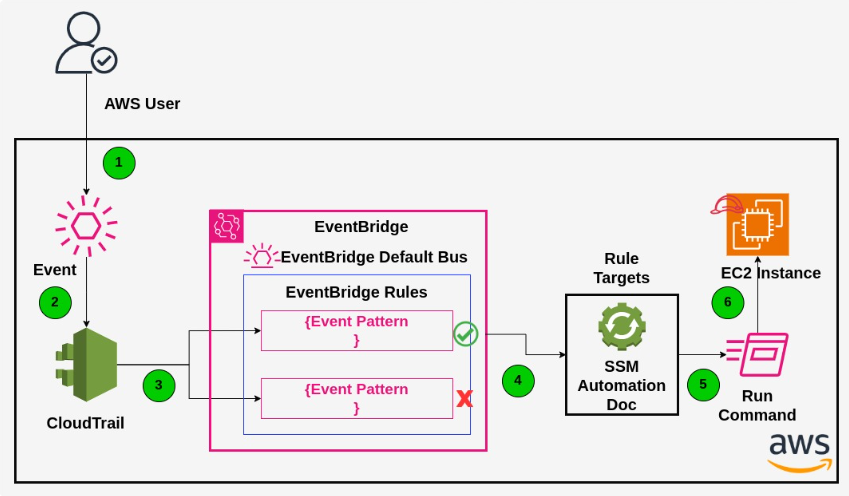
Authorized AWS user creates an EC2 instance through console, CLI, or API with specific naming pattern
AWS API call (event) is automatically registered in CloudTrail and sent to EventBridge default bus
EventBridge evaluates the event against defined rules and matches instance name prefix and platform type
Rule triggers SSM Automation document, passing AssumeRole and InstanceID parameters
SSM document executes RunCommand on EC2 instance, running predefined PowerShell or Shell scripts
Before implementing this automation solution, ensure you have the necessary AWS resources and permissions in place. The solution requires specific IAM roles, policies, and service configurations to function properly.
The implementation follows a structured approach with three main phases: IAM setup, SSM document creation, and EventBridge rule configuration. Each step builds upon the previous one to create a complete automation pipeline.
Create custom policies and three IAM roles: EventBridge role, SSM automation assume role, and EC2 instance role for SSM Agent communication
Build SSM automation document with sleep step (10 minutes for instance registration) and RunCommandOnInstance step for script execution
Configure EventBridge rule with event pattern matching EC2 instance name prefix and platform, targeting the SSM document
Create test EC2 instances with matching name pattern and verify automatic command execution
Monitor execution logs, optimize timing parameters, and extend patterns for additional use cases
The solution leveraged a carefully selected set of AWS services to deliver a robust, scalable, and cost-effective automation platform.
This automation solution delivers significant operational benefits by eliminating manual configuration steps and ensuring consistent instance setup across the entire infrastructure. The event-driven approach provides real-time responsiveness while maintaining reliability and scalability.
Create any Windows EC2 instance with name "ssm-automation-ec2-ANYNAME" and watch automatic script execution
Ensure SSM agent role is attached to EC2 instances for proper communication with Systems Manager
Architecture scales automatically with your infrastructure growth, handling hundreds of instances seamlessly
Easily extend to support different platforms, naming patterns, or additional automation workflows
The EventBridge automation solution delivers significant operational benefits by eliminating manual configuration steps and ensuring consistent instance setup across the entire infrastructure.
Implementation Ready: This EventBridge automation solution is production-ready and can be deployed immediately. Create any Windows EC2 instance with name "ssm-automation-ec2-ANYNAME" and watch automatic script execution in action, ensuring consistent configuration across your entire infrastructure.

Creyente specializes in designing and implementing serverless automation solutions that solve complex infrastructure challenges. Our expertise in AWS services, event-driven architectures, and infrastructure automation enables us to deliver elegant, scalable solutions that reduce operational overhead while improving reliability.
This Auto Scaling Group automation project demonstrates our ability to understand client pain points, design appropriate technical solutions, and deliver production-ready implementations that provide immediate value while remaining maintainable and adaptable for future needs.
💬 No comments yet. Be the first to comment!
Write a comment